Unfollowers Tracker for Instagram
Choose your official Instagram ZIP to see who doesn't follow you back. Add a newer export later to compare changes in your followers.
- Get Instagram data (opens in a new tab)
Export to device · Followers and following · All time
HTML or JSON is fine.
Instagram notifies you when it’s ready. It can take a while.
This ZIP has no followers list. Continue only if the account had 0 followers when this export was made. Otherwise, choose a ZIP that includes the followers list.
Your results
- Followers
- —
- in this export
- Following
- —
- in this export
- Net change
- —
- followers since last export
- Follow you back
- —
- of accounts you follow
What these results mean
These are the accounts listed in your export, not live Instagram data. Request “All time” to avoid a date-limited list. Changes between exports can also reflect renamed, deactivated, deleted or blocked accounts—not only unfollows. Account and date hints come from the ZIP filename.
Sample result
- Followers
- 318
- in this export
- Following
- 274
- in this export
- Net change
- −5
- followers since last export
- Follow you back
- 84%
- of accounts you follow
- @lena.travelsSample account
- @coffee.and.codeSample account
- @mar.photoSample account
- @daily.sketchbookSample account
- @ines.recordsSample account
- @lia.climbsSample account
- @max.thriftsSample account
- @noah.dailySample account
No sample accounts match.
- @daily.sketchbookSample account
- @ben.trailsSample account
- @coffee.and.codeSample account
- @noah.dailySample account
- @june.framesSample account
- @sam.ridesSample account
- @rosa.knitsSample account
- @jonas_thriftsSample account
No sample accounts match.
- @nora_thriftsSample account
- @ivan.plantsSample account
- @theo.drawsSample account
- @luna_photoSample account
- @sam.trailsSample account
- @axel.drawsSample account
- @june.chessSample account
No sample accounts match.
- @theo.ceramicsSample account
- @nora.lensSample account
- @ava.hikesSample account
- @ezra.brewsSample account
- @eli_recordsSample account
- @ella.dancesSample account
- @ivan.drawsSample account
- @ella.surfsSample account
No sample accounts match.
Sample account with made-up usernames. Stars here are not saved.
How it works
You need one file: the data export Instagram makes for you. Request it once, download it, and drop it in the box above. The full guide to downloading your Instagram data walks through every screen.
Open the export page
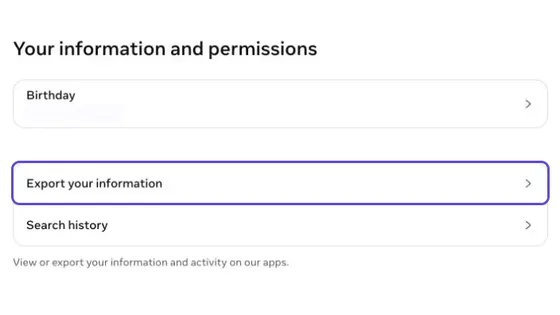
Open the official export page above. Choose Export to device, Followers and following, and All time. HTML or JSON is fine.
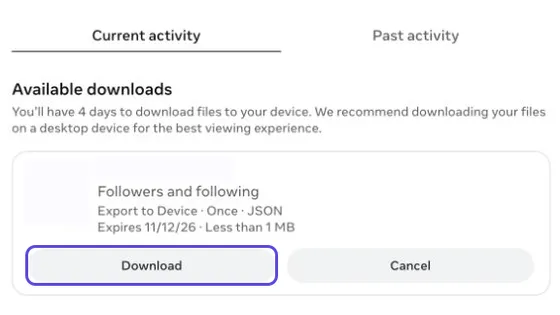
Download when ready
When Instagram says your export is ready, download the ZIP file.
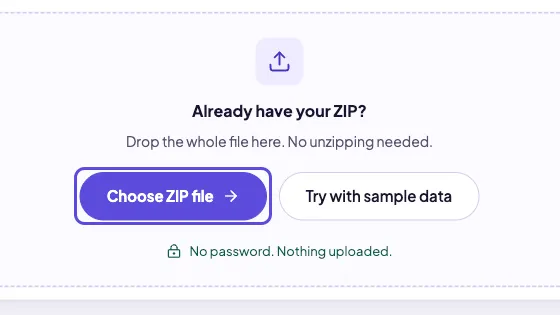
Choose your ZIP
Drop the ZIP here. Your lists appear on this page, and the file never leaves your browser.
How to see who unfollowed you on Instagram
Instagram doesn't tell you when someone unfollows you, and there's no built-in unfollowers list. To check one person, look at their Following list. To get the full list, compare two official exports from different dates. You don't need to give anyone your password or install an app.
Method 1: check one person by hand
- Open their profile and tap Following.
- Search for your own username.
- If you don't show up, they don't follow you anymore (or they never did).
This works for a few people you're curious about. It doesn't work if their account is private and you don't follow them.
Method 2: compare two exports
Your export is a snapshot of who follows you on the day you request it. One snapshot can show who doesn't follow you back, but it can't show who left, because there's nothing to compare it with. That's why your first check won't list any unfollowers.
The first ZIP becomes your baseline, saved in this browser. Next time, request a fresh export and choose it here: we compare the two lists automatically and show accounts that disappeared or appeared. A missing username can indicate an unfollow, a renamed account or another account change—not a confirmed reason.
Upload your first export to set your baseline.
Why not an unfollower app?
Most unfollower apps ask you to sign in with your Instagram password. That hands your account to a stranger, and Instagram may lock accounts that log in from unfamiliar tools. Your official export gives you the same lists without that risk.
Not following back vs. unfollowed
Not following back means you follow someone and they don't follow you. One export is enough to find them, and it includes people who never followed you, like celebrities and brands. Unfollowed means someone followed you before and doesn't now. You can only see that by comparing two exports.
A few things affect the results. If someone changes their username, they show up as one unfollower and one new follower. An account that was deactivated, deleted, or blocked you also disappears from your list, and the export doesn't say which of these happened. If your export doesn't include the full date range, the lists can be incomplete. And we only see changes between your two exports, not the exact day someone left.
Only want the people who don't follow you back? Use the who doesn't follow me back checker.
Why Tracker Unfollowers
You never sign in to Instagram here. We only read the file Instagram gave you.
Your ZIP is read inside your browser. It isn't sent to our server or anyone else.
Your snapshots stay in this browser, so your next ZIP can show follower changes automatically. Keep your ZIPs if you switch browsers or clear site data.
FAQ
Is Tracker Unfollowers free?
Yes. There's no sign-up and no paid plan. Ads keep the site running.
Do I need to enter my Instagram password?
No. You never sign in here. Instagram may ask for your password when you download your export, but that happens on Instagram's own site or app, not ours.
Is there a legit way to see who unfollowed you?
Compare two official exports from different dates. Import the older ZIP first, then the newer one; we show usernames missing from the newer followers list. These can reflect unfollows, renamed accounts or other account changes. One export alone shows who doesn't follow you back, not who left.
Does it work with the HTML export?
Yes, HTML and JSON list formats are supported. Choose the whole ZIP—there is no need to unzip it or select individual files. See the download guide for the export settings.
How long does the Instagram export take?
It depends on how much you ask for. Instagram says an export can take up to 30 days, and you then have 4 days to download it. Asking only for followers and following keeps the file small. Instagram notifies you when it's ready.
Can Instagram ban me for using this?
This site never connects to your Instagram account. It only reads a file you downloaded, so Instagram has no way of knowing you used it. What can trigger limits is unfollowing lots of accounts very quickly, so if you clean up your list, take it slowly.
Does Instagram notify someone when you unfollow them?
No. Instagram doesn't send a notification when you unfollow someone, and it doesn't notify you when someone unfollows you.
Can I use it on my phone?
Yes. Download the export ZIP on your phone, open this page in your browser, and choose the file. Everything runs in the browser, so there's nothing to install.